How do I find genomic sequence for a specific mouse strain?
Overview
You can use the Mouse Sequence Query Form to find sequences by:
  • attribute, such as type, provider name, description, or length;
  • source, such as strain (or species if other than laboratory mouse), tissue, library, or clone collection;
  • properties of annotated markers, such as symbol/name, mapped position, GO classifications, protein domains, gene expression, or phenotype classifications.
Accessing the Mouse Sequence Query Form
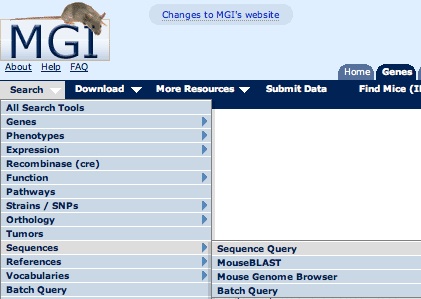
On most MGI pages, you can access the Mouse Sequence Query Form from the Search menu as shown in the image at right.

For this tutorial, open the Mouse Sequence Query Form in a new window. Scroll down this page for further instructions.

Search Menu MS QF

Example 1. Finding genomic sequence for strain 129
  1. Select DNA from the Sequence Type pick list.

  2. Type 129 into the Strain/Species text box.

  3. Select X from the the Chromosome(s) pick list.

  4. Click Search.
MS QF Screen Shot
  1. Check a box in the Select column.

  2. Click the Go button to download the selected sequence in FASTA format.
MS QF Screen Shot